> ## Documentation Index
> Fetch the complete documentation index at: https://dripart-train-lora-docs.mintlify.site/llms.txt
> Use this file to discover all available pages before exploring further.
# How to Troubleshoot and Solve ComfyUI Issues
> Troubleshoot and fix problems caused by custom nodes and extensions
## Quick Issue Diagnosis
If you're experiencing any of these issues, there is a high likelihood that it is caused by custom nodes:
* ComfyUI crashes or won't start
* "Failed to import" errors in console/logs
* UI completely breaks or shows blank screen
* "Prompt execution failed" errors not related to memory issues
* Missing nodes that should be available/installed
## Is It a Custom Node Problem?
Most ComfyUI issues are caused by custom nodes (extensions). Let's check if this is the case.
### Step 1: Test with all custom nodes disabled
Run ComfyUI with all custom nodes disabled:
Start ComfyUI Desktop with custom nodes disabled from the settings menu
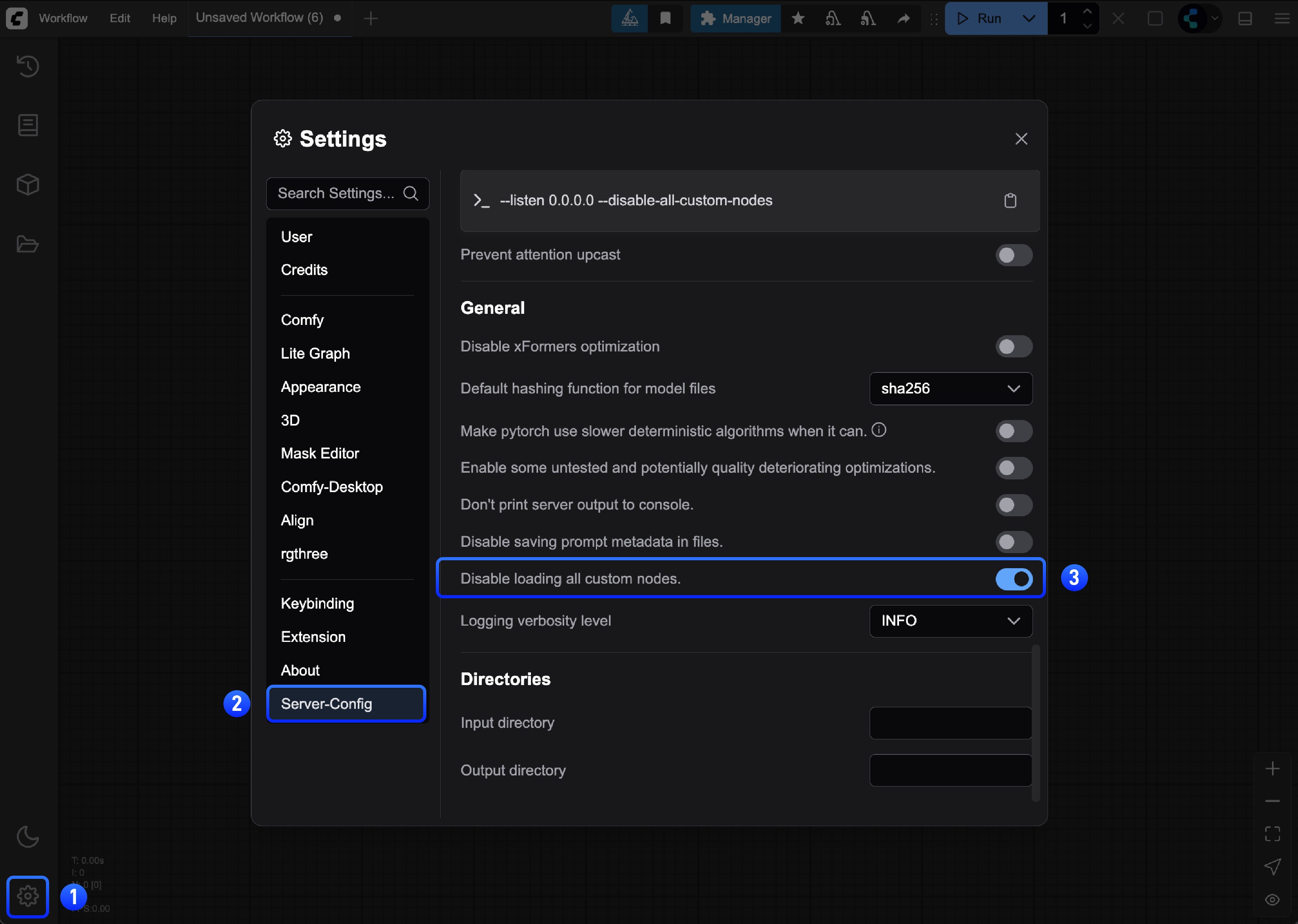
or run the server manually:
```bash
cd path/to/your/comfyui
python main.py --disable-all-custom-nodes
```
```bash
cd ComfyUI
python main.py --disable-all-custom-nodes
```
Open the folder where the portable version is located, and find the `run_nvidia_gpu.bat` or `run_cpu.bat` file
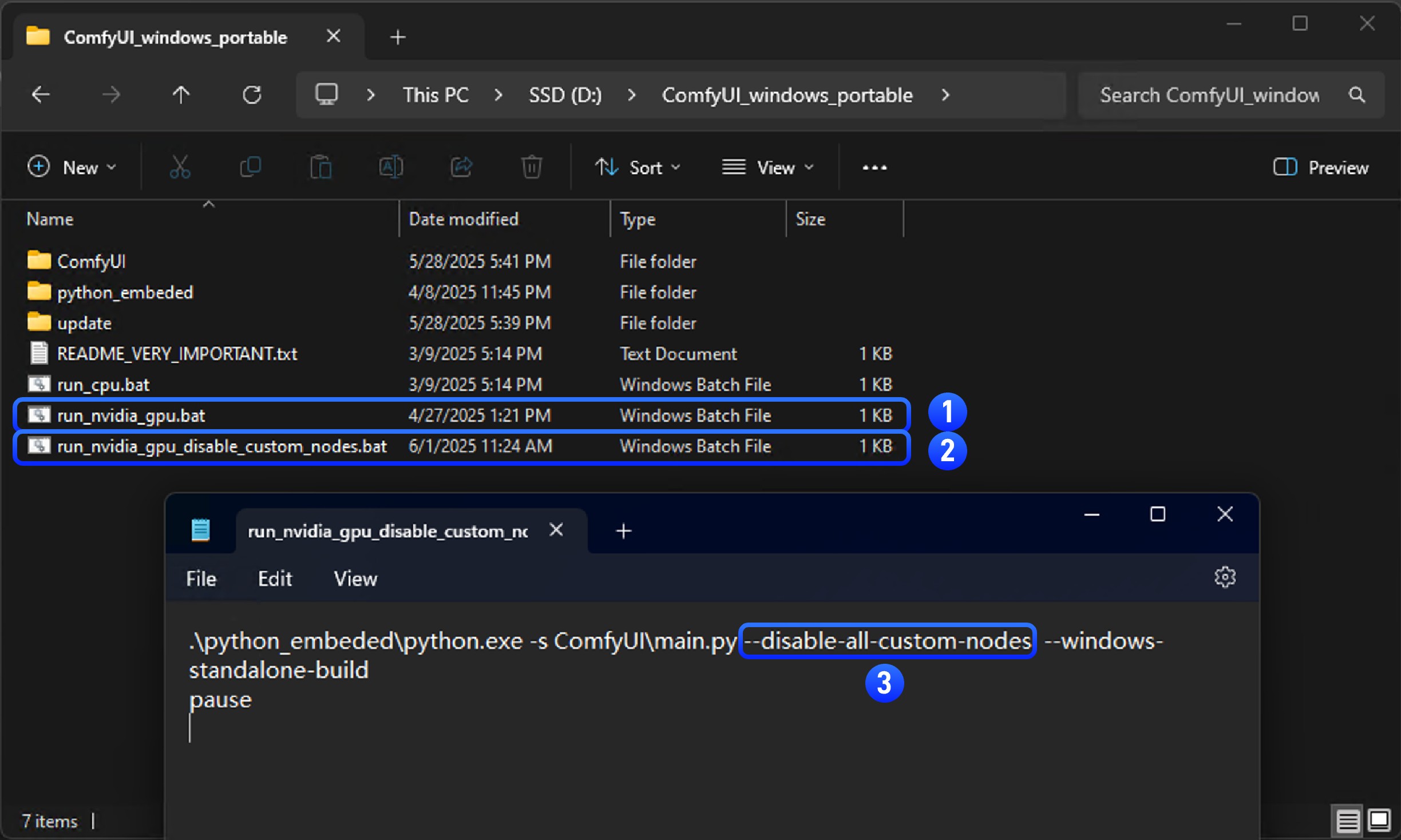
1. Copy `run_nvidia_gpu.bat` or `run_cpu.bat` file and rename it to `run_nvidia_gpu_disable_custom_nodes.bat`
2. Open the copied file with Notepad
3. Add the `--disable-all-custom-nodes` parameter to the file, or copy the parameters below into a `.txt` file and rename the file to `run_nvidia_gpu_disable_custom_nodes.bat`
```bash
.\python_embeded\python.exe -s ComfyUI\main.py --disable-all-custom-nodes --windows-standalone-build
pause
```
4. Save the file and close it
5. Double-click the file to run it. If everything is normal, you should see ComfyUI start and custom nodes disabled
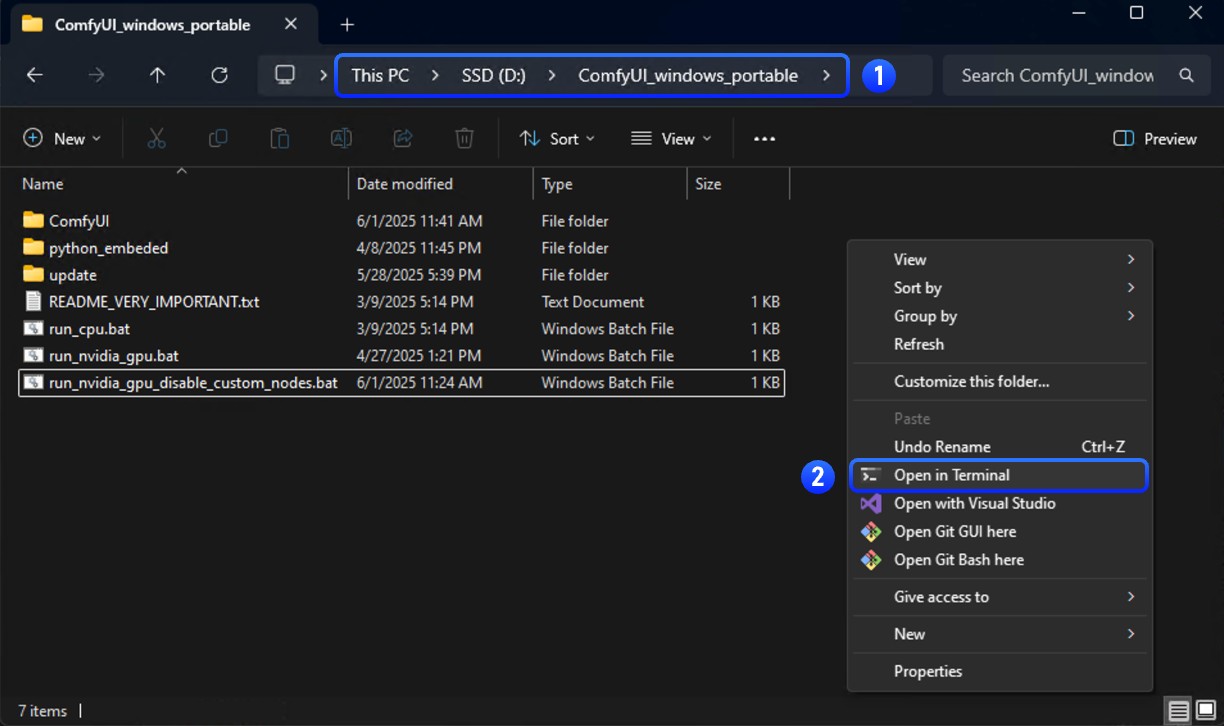
1. Enter the folder where the portable version is located
2. Open the terminal by right-clicking the menu → Open terminal
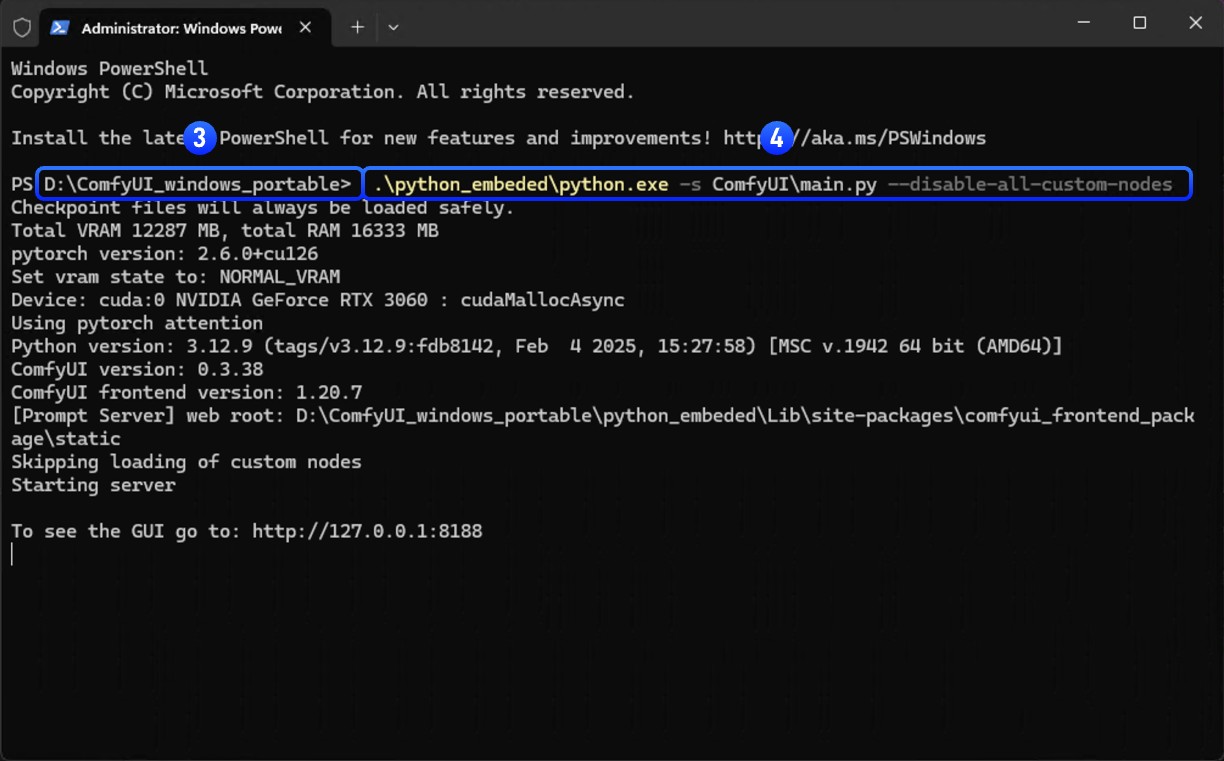
3. Ensure that the folder name is the current directory of the portable version
4. Enter the following command to start ComfyUI through the portable python and disable custom nodes
```
.\python_embeded\python.exe -s ComfyUI\main.py --disable-all-custom-nodes
```
**Results:**
* ✅ **Issue disappears**: A custom node is causing the problem → Continue to Step 2
* ❌ **Issue persists**: Not a custom node issue → [Report the issue](#reporting-issues)
## Step 2: Find the Problematic Custom Node
We'll use **binary search** to quickly find which custom node is causing issues. This is much faster than testing nodes one by one.
### Option A: Using Comfy CLI (Recommended)
If you have [Comfy CLI](/comfy-cli/getting-started) installed, you can use the automated bisect tool to find the problematic node:
```bash
# Start a bisect session
comfy-cli node bisect start
# Follow the prompts:
# - Test ComfyUI with the current set of enabled nodes
# - Mark as 'good' if the issue is gone: comfy-cli node bisect good
# - Mark as 'bad' if the issue persists: comfy-cli node bisect bad
# - Repeat until the problematic node is identified
# Reset when done
comfy-cli node bisect reset
```
The bisect tool will automatically enable/disable nodes and guide you through the process.
### Option B: Manual Binary Search
If you prefer to do the process manually or don't have Comfy CLI installed, follow the steps below:
### How Binary Search Works
Instead of testing each node individually (which could take hours), we split the nodes in half repeatedly:
```
8 nodes → Test 4 nodes → Test 2 nodes → Test 1 node ✓
Example with 8 nodes:
1. Test nodes 1-4: Issue persists ✓ → Problem in remaining nodes 5-8
2. Test nodes 5-6: Issue gone ✓ → Problem in nodes 7-8
3. Test node 7: Issue persists ✓ → Node 7 is the problem!
This takes only 3 tests instead of testing all 8 nodes individually.
```
### Binary Search Process
Before starting, **create a backup** of your custom\_nodes folder in case something goes wrong.
#### Create Temporary Folders
```bash
# Create backup and temporary folder
mkdir "%USERPROFILE%\custom_nodes_backup"
mkdir "%USERPROFILE%\custom_nodes_temp"
# Backup everything first
xcopy "custom_nodes\*" "%USERPROFILE%\custom_nodes_backup\" /E /H /Y
```
```bash
# Create backup and temporary folder
mkdir ~/custom_nodes_backup
mkdir ~/custom_nodes_temp
# Backup everything first
cp -r custom_nodes/* ~/custom_nodes_backup/
```
```bash
# Create backup and temporary folder
mkdir /content/custom_nodes_backup
mkdir /content/custom_nodes_temp
# Backup everything first
cp -r /content/ComfyUI/custom_nodes/* /content/custom_nodes_backup/
```
#### Find the Problematic Node
1. **List your custom nodes:**
```bash
dir custom_nodes
```
```bash
ls custom_nodes/
```
```bash
ls /content/ComfyUI/custom_nodes/
```
2. **Split nodes in half:**
Let's say you have 8 custom nodes. Move the first half to temporary storage:
```bash
# Move first half (nodes 1-4) to temp
move "custom_nodes\node1" "%USERPROFILE%\custom_nodes_temp\"
move "custom_nodes\node2" "%USERPROFILE%\custom_nodes_temp\"
move "custom_nodes\node3" "%USERPROFILE%\custom_nodes_temp\"
move "custom_nodes\node4" "%USERPROFILE%\custom_nodes_temp\"
```
```bash
# Move first half (nodes 1-4) to temp
mv custom_nodes/node1 ~/custom_nodes_temp/
mv custom_nodes/node2 ~/custom_nodes_temp/
mv custom_nodes/node3 ~/custom_nodes_temp/
mv custom_nodes/node4 ~/custom_nodes_temp/
```
```bash
# Move first half (nodes 1-4) to temp
mv /content/ComfyUI/custom_nodes/node1 /content/custom_nodes_temp/
mv /content/ComfyUI/custom_nodes/node2 /content/custom_nodes_temp/
mv /content/ComfyUI/custom_nodes/node3 /content/custom_nodes_temp/
mv /content/ComfyUI/custom_nodes/node4 /content/custom_nodes_temp/
```
3. **Test ComfyUI:**
```bash
python main.py
```
4. **Interpret results:**
* **Issue persists**: Problem is in the remaining nodes (5-8)
* **Issue gone**: Problem was in the moved nodes (1-4)
5. **Narrow it down:**
* If issue persists: Move half of remaining nodes (e.g., nodes 7-8) to temp
* If issue gone: Move half of temp nodes (e.g., nodes 3-4) back to custom\_nodes
6. **Repeat until you find the single problematic node**
### Visual Example
Let's walk through a complete example with 8 custom nodes:
```
📁 custom_nodes/
├── 🔧 ComfyUI-Manager
├── 🎨 ComfyUI-Custom-Scripts
├── 🖼️ ComfyUI-Impact-Pack
├── 🔄 ComfyUI-Workflow-Component
├── 📊 ComfyUI-AnimateDiff-Evolved
├── 🎭 ComfyUI-FaceRestore
├── ⚡ ComfyUI-Advanced-ControlNet
└── 🛠️ ComfyUI-Inspire-Pack
```
**Round 1:** Move first 4 to temp
* Test → Issue persists ✓
* Problem is in: ComfyUI-AnimateDiff-Evolved, ComfyUI-FaceRestore, ComfyUI-Advanced-ControlNet, ComfyUI-Inspire-Pack
**Round 2:** Move 2 of the remaining 4 to temp
* Test → Issue gone ✓
* Problem is in: ComfyUI-Advanced-ControlNet, ComfyUI-Inspire-Pack
**Round 3:** Move 1 of the remaining 2 to temp
* Test → Issue persists ✓
* **Found it!** ComfyUI-Inspire-Pack is the problematic node
## Step 3: Fix the Issue
Once you've identified the problematic custom node:
### Option 1: Update the Node
1. Check if there's an update available in ComfyUI Manager
2. Update the node and test again
### Option 2: Replace the Node
1. Look for alternative custom nodes with similar functionality
2. Check the [ComfyUI Registry](https://registry.comfy.org) for alternatives
### Option 3: Report the Issue
Contact the custom node developer:
1. Find the node's GitHub repository
2. Create an issue with:
* Your ComfyUI version
* Error messages/logs
* Steps to reproduce
* Your operating system
### Option 4: Remove or Disable the Node
If no fix is available and you don't need the functionality:
1. Remove the problematic node from `custom_nodes/` or disable it in the ComfyUI Manager interface
2. Restart ComfyUI
## Reporting Issues
If the issue isn't caused by custom nodes, refer to the general [troubleshooting overview](/troubleshooting/overview) for other common problems.
### For Custom Node-Specific Issues
Contact the custom node developer:
* Find the node's GitHub repository
* Create an issue with your ComfyUI version, error messages, reproduction steps, and OS
* Check the node's documentation and Issues page for known issues
### For ComfyUI Core Issues
* **GitHub**: [ComfyUI Issues](https://github.com/comfyanonymous/ComfyUI/issues)
* **Forum**: [Official ComfyUI Forum](https://forum.comfy.org/)
### For Desktop App Issues
* **GitHub**: [ComfyUI Desktop Issues](https://github.com/Comfy-Org/desktop/issues)
### For Frontend Issues
* **GitHub**: [ComfyUI Frontend Issues](https://github.com/Comfy-Org/ComfyUI_frontend/issues)
For general installation, model, or performance issues, see our [troubleshooting overview](/troubleshooting/overview) and [model issues](/troubleshooting/model-issues) pages.