> ## Documentation Index
> Fetch the complete documentation index at: https://dripart-train-lora-docs.mintlify.site/llms.txt
> Use this file to discover all available pages before exploring further.
# Runway API 节点 图像生成 ComfyUI 官方示例
> 本文将介绍如何在 ComfyUI 中使用 Runway 节点进行文生图和参考生图功能
Runway 是一家专注于生成式AI的科技公司,提供强大的图像生成功能。其模型支持风格迁移、图像扩展和细节控制等特性。目前 ComfyUI 已集成 Runway API,你可以直接在 ComfyUI 中使用相关节点进行图像生成。
本篇指南中,我们将引导你完成下面的工作流:
* 文生图
* 参考生图
使用 API 节点需要保证你已经正常登录,并在受许可的网络环境下使用,请参考[API 节点总览](/zh-CN/tutorials/api-nodes/overview)部分文档来了解使用 API 节点的具体使用要求。
如果在加载下面的工作流文件时,你发现存在节点缺失,可能是因为以下情况:
1. 你使用的 ComfyUI 版本不是最新的开发(nightly)版本。
2. 你使用的 ComfyUI 版本是稳定(release)版本或桌面版(desktop)版本(不包含最新的功能更新)。
3. 你使用的 ComfyUI 版本是最新的 commit 版本,但在启动过程中部分节点导入失败了。
请先确保你已经成功更新 ComfyUI 到最新的开发(nightly)版本, 请查看:[如何更新 ComfyUI](zh-CN/installation/update_comfyui) 部分了解如何更新 ComfyUI。
## Runway Image 文生图 工作流
### 1. 工作流文件下载
下面的图片的`metadata`中已经包含工作流信息,请下载并拖入 ComfyUI 中加载对应工作流。

### 2. 按步骤完成工作流的运行
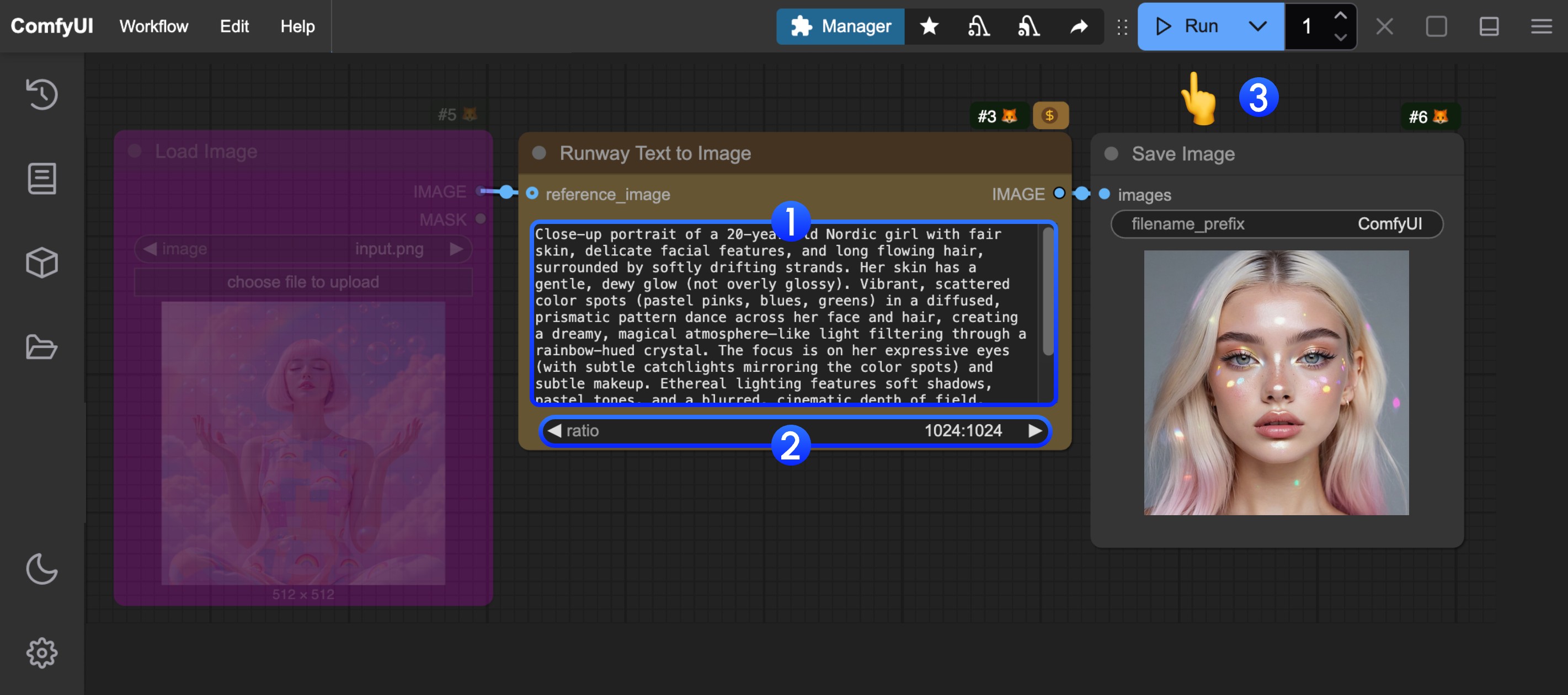
你可参考图片中的序号来完成最基础的文生图工作流运行:
1. 在 `Runway Text to Image` 的 `prompt` 中输入提示词
2. (可选) 设置调整 `ratio` 来设置不同的输出比例
3. 点击 `Run` 按钮,或者使用快捷键 `Ctrl(cmd) + Enter(回车)` 来执行图像的生成。
4. 等待 API 返回结果后,你可在 `Save Image` 节点中查看生成的图像(右键可以保存),对应的图像也会被保存至 `ComfyUI/output/` 目录下。
## Runway Image 参考生图 工作流
### 1. 工作流及输入图像下载
下面的图片的`metadata`中已经包含工作流信息,请下载并拖入 ComfyUI 中加载对应工作流。

下载下面的图像用于输入

### 2. 按步骤完成工作流的运行
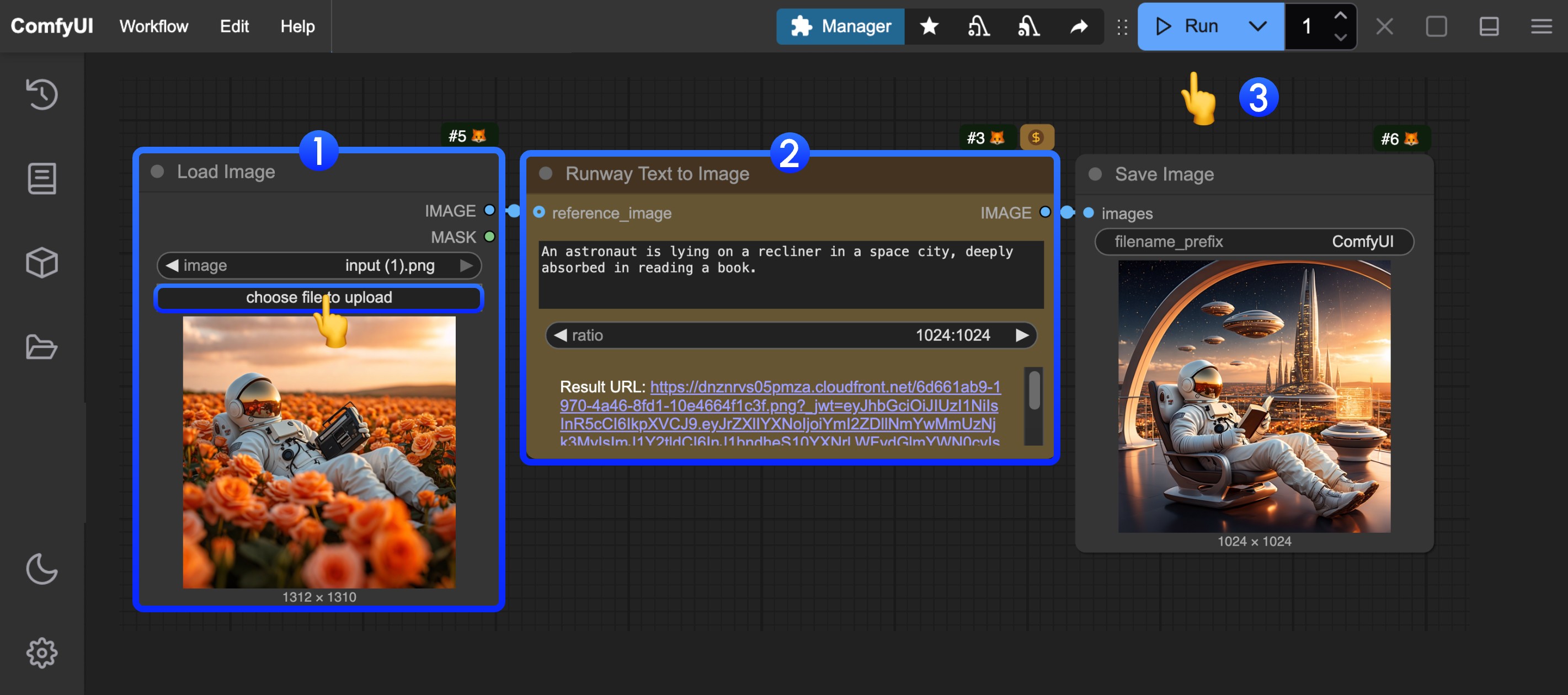
你可参考图片中的序号来完成最基础的参考生图工作流运行:
1. 在 `Load Image` 节点中加载提供的输入图像
2. 在 `Runway Text to Image` 的 `prompt` 中输入提示词及进行尺寸调整
3. 点击 `Run` 按钮,或者使用快捷键 `Ctrl(cmd) + Enter(回车)` 来执行图像的生成。
4. 等待 API 返回结果后,你可在 `Save Image` 节点中查看生成的图像(右键可以保存),对应的图像也会被保存至 `ComfyUI/output/` 目录下。