> ## Documentation Index
> Fetch the complete documentation index at: https://dripart-train-lora-docs.mintlify.site/llms.txt
> Use this file to discover all available pages before exploring further.

# Cosmos Predict2 视频生成 ComfyUI 官方示例

> 本文介绍了如何在 ComfyUI 中完成 Cosmos-Predict2 文生视频及图生视频的工作流

Cosmos-Predict2 是由 NVIDIA 推出的新一代物理世界基础模型，专为物理 AI 场景下的高质量视觉生成与预测任务设计。
该模型具备极高的物理准确性、环境交互性和细节还原能力，能够真实模拟复杂的物理现象与动态场景。
Cosmos-Predict2 支持文本到图像（Text2Image）和视频到世界（Video2World）等多种生成方式，广泛应用于工业仿真、自动驾驶、城市规划、科学研究等领域，是推动智能视觉与物理世界深度融合的重要基础工具。

GitHub:[Cosmos-predict2](https://github.com/nvidia-cosmos/cosmos-predict2)
huggingface: [Cosmos-Predict2](https://huggingface.co/collections/nvidia/cosmos-predict2-68028efc052239369a0f2959)

本篇指南将引导你完成在 ComfyUI 中  **图生视频** 的工作流

对于文生图部分，请参考下面的部分

<Card title="Cosmos Predict2 文生图" icon="book" href="/zh-CN/tutorials/image/cosmos/cosmos-predict2-t2i">
  使用 Cosmos-Predict2 的进行文生图
</Card>

<Tip>
  如果在加载下面的工作流文件时，你发现存在节点缺失，可能是因为以下情况：

  1. 你使用的 ComfyUI 版本不是最新的开发（nightly）版本。
  2. 你使用的 ComfyUI 版本是稳定（release）版本或桌面版（desktop）版本（不包含最新的功能更新）。
  3. 你使用的 ComfyUI 版本是最新的 commit 版本，但在启动过程中部分节点导入失败了。

  请先确保你已经成功更新 ComfyUI 到最新的开发（nightly）版本, 请查看：[如何更新 ComfyUI](zh-CN/installation/update_comfyui) 部分了解如何更新 ComfyUI。
</Tip>

## Cosmos Predict2 Video2World 工作流

#### 1.下载工作流文件

<video controls className="w-full aspect-video" src="https://raw.githubusercontent.com/Comfy-Org/example_workflows/refs/heads/main/video/cosmos/predict2/cosmos_predict2_2B_video2world_480p_16fps.mp4" />

<a className="prose" target="_blank" href="https://raw.githubusercontent.com/Comfy-Org/example_workflows/refs/heads/main/video/cosmos/predict2/cosmos_predict2_2B_video2world_480p_16fps.json" style={{ display: 'inline-block', backgroundColor: '#0078D6', color: '#ffffff', padding: '10px 20px', borderRadius: '8px', borderColor: "transparent", textDecoration: 'none', fontWeight: 'bold'}}>
  <p className="prose" style={{ margin: 0, fontSize: "0.8rem" }}>下载 Json 格式工作流文件</p>
</a>

请下载下面的图片作为输入文件：

![输入图片](https://raw.githubusercontent.com/Comfy-Org/example_workflows/refs/heads/main/video/cosmos/predict2/input.png)

### 2.手动模型安装

**Diffusion model**

* [cosmos\_predict2\_2B\_video2world\_480p\_16fps.safetensors](https://huggingface.co/Comfy-Org/Cosmos_Predict2_repackaged/resolve/main/cosmos_predict2_2B_video2world_480p_16fps.safetensors)

其它权重请访问 [Cosmos\_Predict2\_repackaged](https://huggingface.co/Comfy-Org/Cosmos_Predict2_repackaged) 进行下载

**Text encoder**

[oldt5\_xxl\_fp8\_e4m3fn\_scaled.safetensors](https://huggingface.co/comfyanonymous/cosmos_1.0_text_encoder_and_VAE_ComfyUI/resolve/main/text_encoders/oldt5_xxl_fp8_e4m3fn_scaled.safetensors)

**VAE**

[wan\_2.1\_vae.safetensors](https://huggingface.co/Comfy-Org/Wan_2.1_ComfyUI_repackaged/resolve/main/split_files/vae/wan_2.1_vae.safetensors)

文件保存位置

```
📂 ComfyUI/
├──📂 models/
│   ├── 📂 diffusion_models/
│   │   └─── cosmos_predict2_2B_video2world_480p_16fps.safetensors
│   ├── 📂 text_encoders/
│   │   └─── oldt5_xxl_fp8_e4m3fn_scaled.safetensors
│   └── 📂 vae/
│       └──  wan_2.1_vae.safetensors
```

### 3. 按步骤完成工作流运行
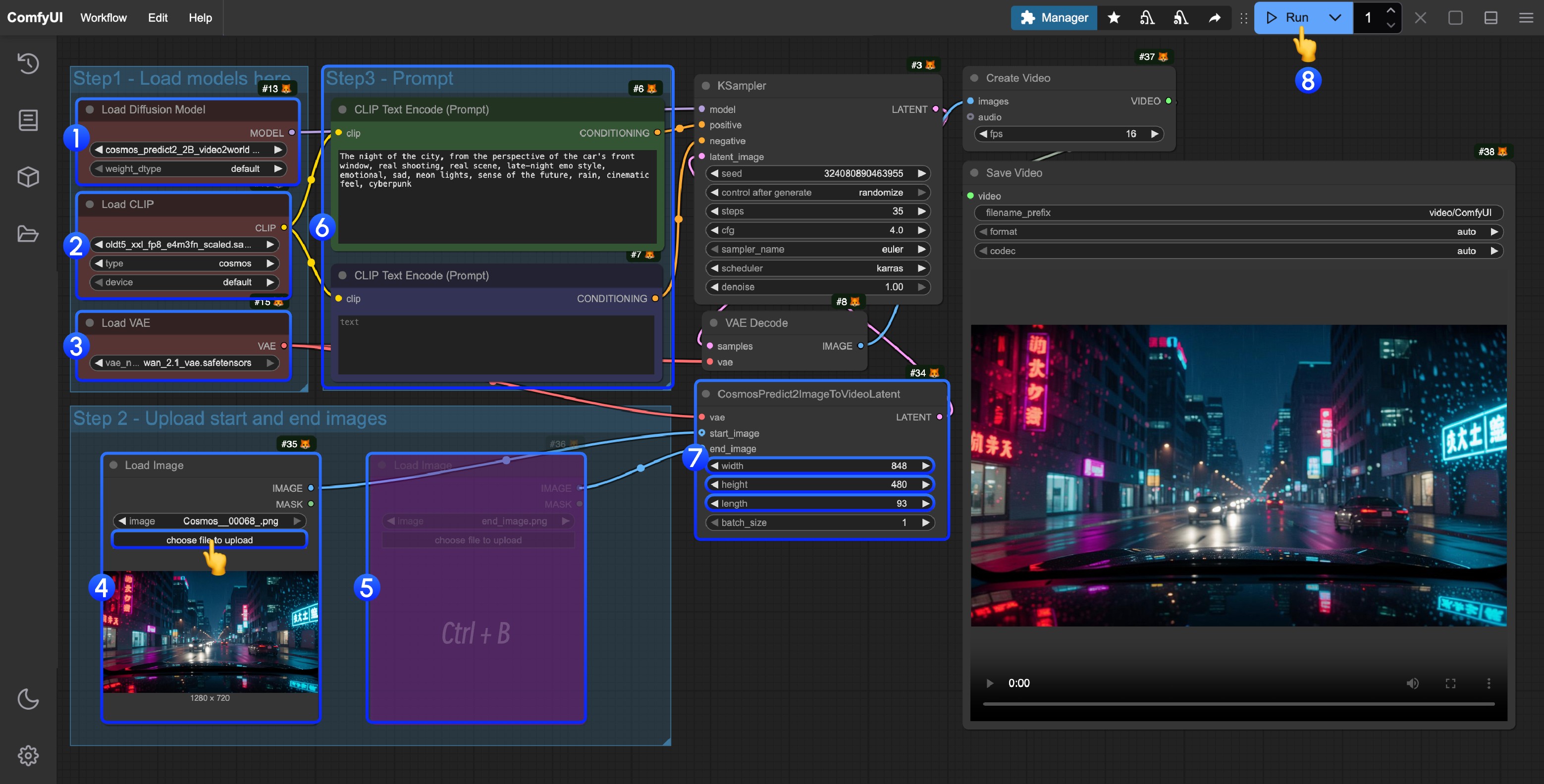
![工作流使用步骤图](https://mintlify.s3.us-west-1.amazonaws.com/dripart-train-lora-docs/images/tutorial/video/cosmos/cosmos_predict2_2B_video2world_480p_16fps_step_guide.jpg)

请参照图片序号进行逐步确认，来保证对应工作流的顺利运行

1. 确保 `Load Diffusion Model` 节点加载了 `cosmos_predict2_2B_video2world_480p_16fps.safetensors`
2. 确保 `Load CLIP` 节点加载了 `oldt5_xxl_fp8_e4m3fn_scaled.safetensors`
3. 确保 `Load VAE` 节点加载了 `wan_2.1_vae.safetensors`
4. 在 `Load Image` 节点中上传提供的输入图片
5. (可选)如果需要首尾帧控制，可以使用快捷键 `Ctrl(cmd) + B` 来启用尾帧输入
6. (可选) 你可以在 `ClipTextEncode` 节点中修改提示词
7. (可选) 修改 `CosmosPredict2ImageToVideoLatent` 节点中的尺寸和帧数
8. 点击 `Run` 按钮，或者使用快捷键 `Ctrl(cmd) + Enter(回车)` 来执行视频生成
9. 生成完成后对应的视频会自动保存到 `ComfyUI/output/` 目录下，你也可以在 `save video` 节点中预览或者调整保存位置